Teleco Demo Application
Learn how the Pink Mobile demo app models fine-grained authorization with Permit.io, from resources and roles to relationships and conditions. This page is for developers who want to see a complete policy model built in code with the Permit Node.js SDK before they design their own.
Pink Mobile is a mobile plan management app built with Next.js. You switch between three personas (Customer, Representative, and Manager) to see what each one can do. The code is in the pink-mobile folder of the permitio/examples repository.
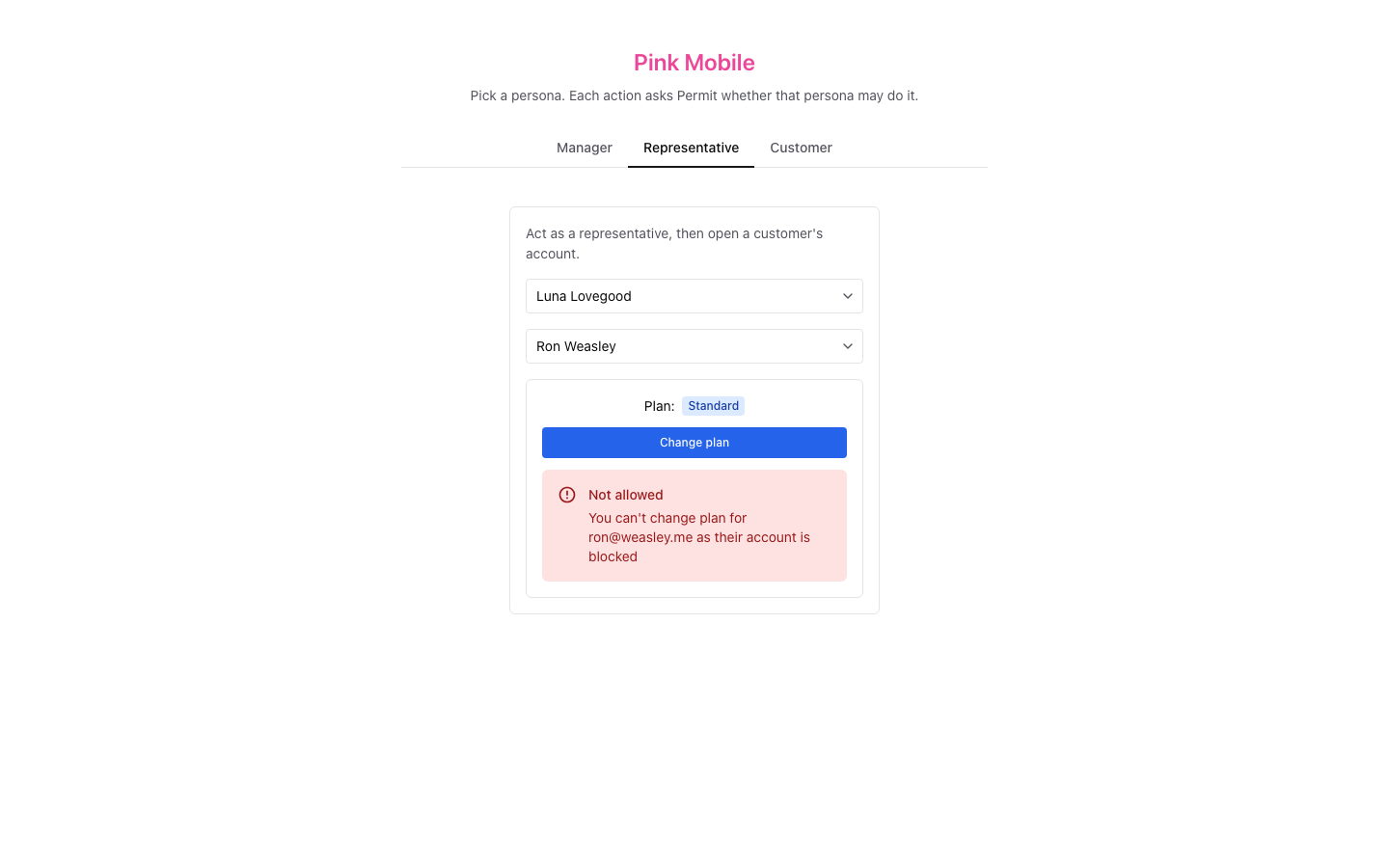
In the following screenshot, the representative Luna opens the account of the customer Ron. Permit allows Luna to view the account, and denies the plan change because Ron's account is blocked:
How the authorization model is organized
The Pink Mobile setup splits authorization into three parts. Each part has its own section on this page. All paths are relative to the pink-mobile folder:
| Part | What it contains | Where Pink Mobile defines it |
|---|---|---|
| Policy model | Resources, actions, roles, relationships, role derivations, condition sets, and the rules that connect them | lib/policy.ts, written to Permit by scripts/setup.ts |
| Authorization data | Users, role assignments, and relationship tuples | lib/policy.ts for the demo data, and lib/authorizer.ts for the changes the app makes |
| Enforcement | Permission checks and filtered queries in the app | lib/authorizer.ts and the API routes in pages/api |
Both the policy model and the authorization data are stored in the Permit control plane, which runs in Permit's cloud. The Permit control plane syncs both to the policy decision point (PDP), the data plane component that runs in your network and answers each check. To learn how the two planes work, see Control & Data planes.
Pink Mobile creates everything through the Permit API, with the Node.js SDK for every call except the one that creates the user attribute. You can create the same policy model in the Permit dashboard.
Configure the policy model
The policy model defines what can be protected and who can do what. The following diagram shows the Pink Mobile entities:
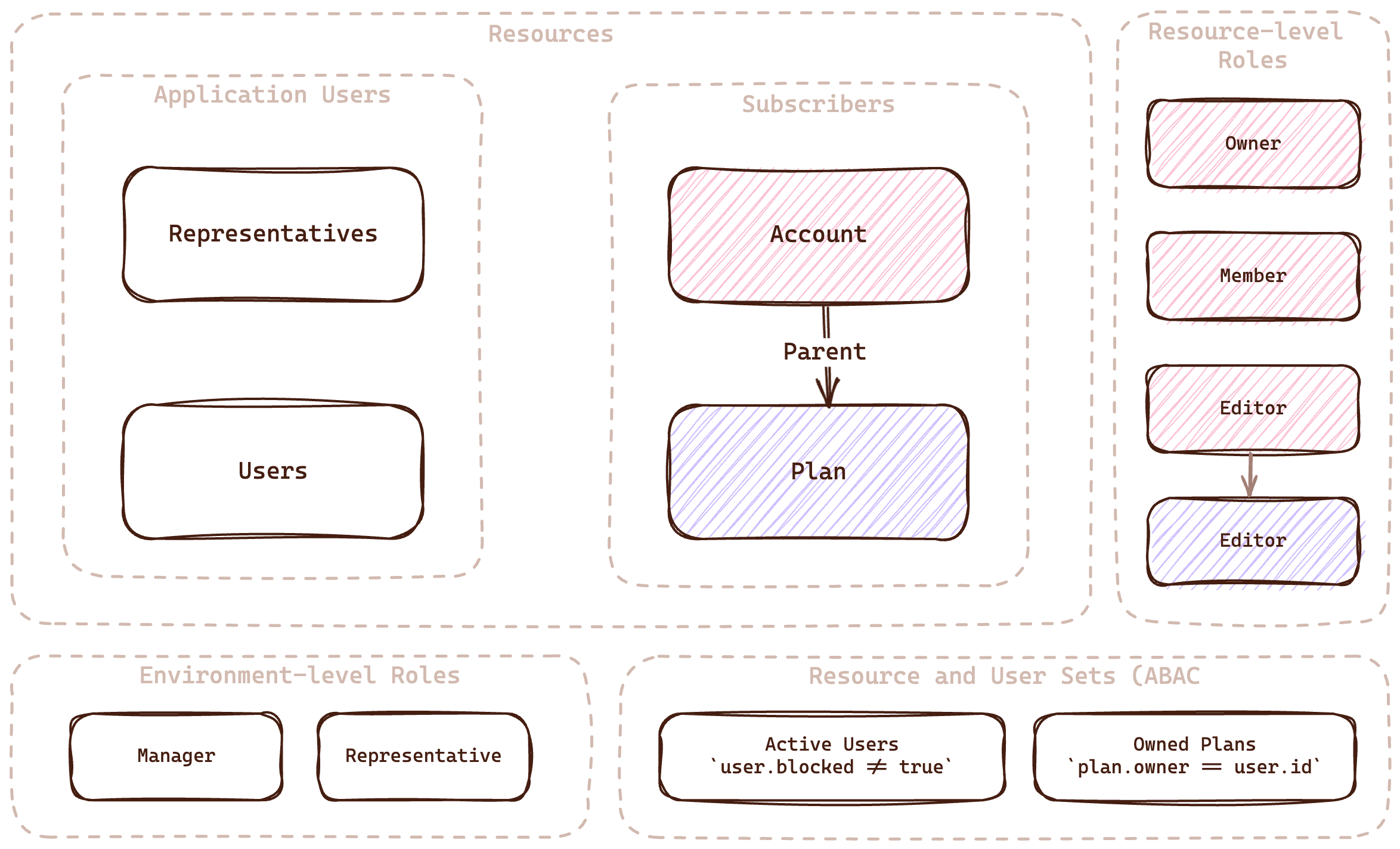
The full configuration is in lib/policy.ts. The file holds the policy as data, and runSetup() in lib/setup.ts writes each entry with the matching SDK call, such as permit.api.resources.create(). Setup is safe to run again: it updates the objects that exist.
Resources
A resource is a type of object that you protect. Pink Mobile has four resources:
| Resource | What it represents |
|---|---|
| Users | Customers who can have a representative manage their plan |
| Representatives | Agents who manage customers |
| Account | The top-level resource for everything that belongs to a customer, such as personal details |
| Plan | The customer's mobile plan |
The following entry in lib/policy.ts declares the Representatives resource with its list and assign actions:
{
  key: 'representatives',
  name: 'Representatives',
  actions: { list: { name: 'List' }, assign: { name: 'Assign' } },
},
Resource relationships
The Account resource is the parent of the Plan resource. A relationship lets permissions on an account apply to the plan that belongs to it. For example, a user who can edit an account can also edit the account's plan.
The Plan resource declares account as its parent. The plan also has an owner attribute, which the Owned Plans resource set compares with the user's key:
{
  key: 'plan',
  name: 'Plan',
  actions: { change: { name: 'Change' }, view: { name: 'View' } },
  attributes: { owner: { type: 'string', description: 'The key of the user the plan is for' } },
  relations: { parent: 'account' },
  // roles: see Role derivations
},
Roles
Roles group permissions on resources. Pink Mobile uses two kinds of roles.
Environment-level roles
An environment-level role grants permissions on every instance of a resource type in the environment.
| Role | Permissions |
|---|---|
| Manager | Assign and list representatives, create and list users, view accounts and plans |
| Representative | List users |
The following entry declares the Manager role:
{
  key: 'manager',
  name: 'Manager',
  permissions: [
    'representatives:list',
    'representatives:assign',
    'users:list',
    'users:create',
    'account:view',
    'plan:view',
  ],
},
Resource-level roles
A resource-level role grants permissions only on the resource instances a user is assigned to. This page writes resource-level roles as Resource#Role.
| Role | Permissions |
|---|---|
Account#Owner | view and manage on the account |
Account#Member | view on the account |
Account#Editor | view on the account, and derives Plan#Editor on the account's plan |
Plan#Editor | view and change on the plan |
The Account resource declares its three resource-level roles:
{
  key: 'account',
  name: 'Account',
  actions: { manage: { name: 'Manage' }, view: { name: 'View' } },
  roles: {
    owner: { name: 'Owner', permissions: ['view', 'manage'] },
    editor: { name: 'Editor', permissions: ['view'] },
    member: { name: 'Member', permissions: ['view'] },
  },
},
Role derivations
A role derivation grants a role on a related resource. Pink Mobile derives Plan#Editor from Account#Editor: every user with the Account#Editor role on an account gets the Plan#Editor role on the plan whose parent is that account.
The Plan resource declares the editor role and its derivation with granted_to:
roles: {
  editor: {
    name: 'Editor',
    permissions: ['view', 'change'],
    // An editor on an account is an editor on the plan that account is the parent of.
    granted_to: {
      users_with_role: [
        { role: 'editor', on_resource: 'account', linked_by_relation: 'parent' },
      ],
    },
  },
},
Conditions
Condition sets group users or resources by their attributes. You grant permissions to a condition set in the policy, and the PDP includes a user or resource in the set when its attributes match the conditions.
User sets
A user set is a condition set based on user attributes. Setup creates the blocked user attribute (a boolean) and two user sets:
| User set | Condition | Description |
|---|---|---|
| Blocked Users | user.blocked == true | Users whose account is blocked |
| Active Users | user.blocked == false | Users whose account is active |
The following entry declares the Blocked Users user set:
{
  key: 'blocked_users',
  name: 'Blocked Users',
  type: 'userset',
  conditions: { allOf: [{ allOf: [{ 'user.blocked': { equals: true } }] }] },
},
Resource sets
A resource set is a condition set based on resource attributes. A resource set condition can compare a resource attribute with a user attribute, which lets you check ownership. Pink Mobile creates one resource set:
| Resource set | Condition | Description |
|---|---|---|
| Owned Plans | resource.owner == user.key | Plans whose owner attribute matches the user's key |
The following entry declares the Owned Plans resource set:
{
  key: 'owned_plans',
  name: 'Owned Plans',
  type: 'resourceset',
  resource_id: 'plan',
  conditions: { allOf: [{ allOf: [{ 'resource.owner': { equals: { ref: 'user.key' } } }] }] },
},
Policy rules
The policy rules connect roles and condition sets to the permissions they grant. After setup runs, the Policy Editor in the Permit dashboard shows this table:
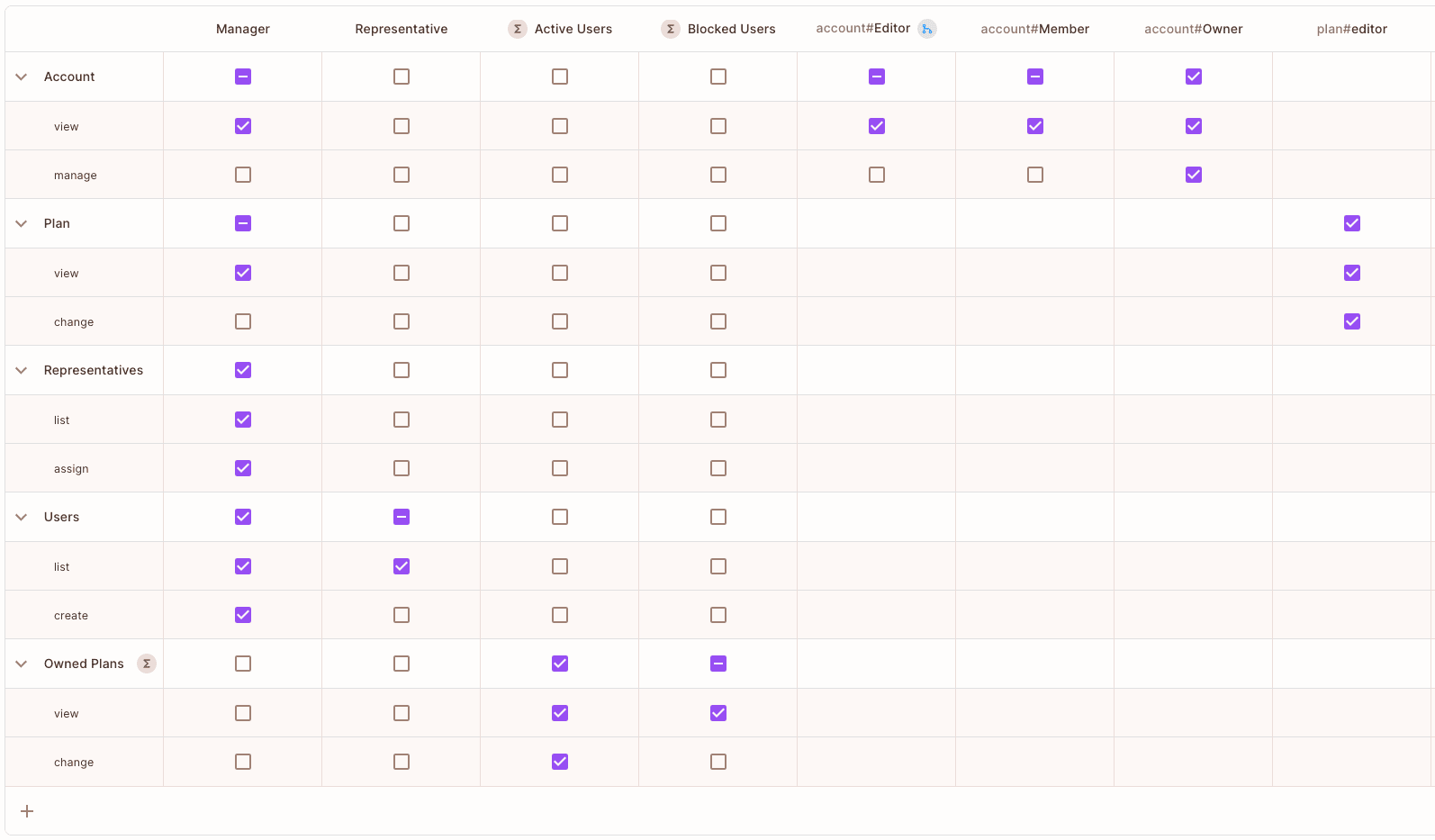
The following rules in lib/policy.ts let active users view and change the plans they own, and blocked users only view them:
export const conditionSetRules: ConditionSetRuleCreate[] = [
  { user_set: 'active_users', resource_set: 'owned_plans', permission: 'plan:view' },
  { user_set: 'active_users', resource_set: 'owned_plans', permission: 'plan:change' },
  { user_set: 'blocked_users', resource_set: 'owned_plans', permission: 'plan:view' },
];
Sync the authorization data
The PDP needs data about the app's users and objects to evaluate the policy model: users with their attributes, role assignments, and relationships between resource instances. Pink Mobile defines its demo data in lib/policy.ts, and setup writes it. Running setup again puts every demo user's roles and attributes back to their starting state.
Users
Each user needs a unique key that the app uses in permission checks. In a production app, you sync users when they sign up or sign in through your authentication provider. See Sync users. Pink Mobile creates six users in lib/policy.ts instead: three customers with a plan and a blocked attribute, and three employees.
export const users: UserCreate[] = [
  ...customers.map(({ email, firstName, lastName, plan, blocked }) => ({
    key: email,
    email,
    first_name: firstName,
    last_name: lastName,
    attributes: { plan, blocked },
  })),
  ...employees.map(({ email, firstName, lastName }) => ({
    key: email,
    email,
    first_name: firstName,
    last_name: lastName,
    attributes: {},
  })),
];
Setup syncs each user with permit.api.users.sync(), which replaces the user's attributes. When a plan changes, the app updates the customer's plan attribute with permit.api.users.update() and keeps the other attributes.
User roles
A role assignment gives a user an environment-level role or a resource-level role on one instance. Pink Mobile uses Permit's default tenant (TENANT in lib/model.ts).
The following entry assigns the environment-level representative role to sirius@pink.mobile:
{ user: 'sirius@pink.mobile', role: 'representative', tenant: TENANT },
The following entry assigns the resource-level owner role on the account:harry instance, which is Account#Owner, to the harry@potter.io user:
{ user: 'harry@potter.io', role: 'owner', resource_instance: 'account:harry', tenant: TENANT },
Setup passes each entry to permit.api.roleAssignments.assign(). When the manager assigns a customer to a representative, assignCustomer() in lib/authorizer.ts makes the representative an editor on the customer's account:
export async function assignCustomer(representative: string, accountKey: string): Promise<void> {
  await permit().api.roleAssignments.assign({
    user: representative,
    role: 'editor',
    resource_instance: `${ACCOUNT_PREFIX}${accountKey}`,
  });
}
The call leaves out the tenant, so Permit answers HTTP 404 for an account that doesn't exist instead of creating the instance.
Relationship tuples
A relationship tuple links two resource instances with a relation. The Plan#Editor role derivation applies only to plans that have a parent relationship tuple with an account.
A customer's account and plan instances share one key, the part of their email before the @: harry@potter.io owns account:harry, which is the parent of plan:harry. The following code makes each customer's account the parent of their plan:
export const relationshipTuples: RelationshipTupleCreate[] = customers.map(({ email }) => ({
  subject: `account:${accountKey(email)}`,
  relation: 'parent',
  object: `plan:${accountKey(email)}`,
  tenant: TENANT,
}));
Enforce decisions in the app
Pink Mobile enforces the policy in two ways: a permission check in each API route before it reads or changes anything, and filtered queries that return only the data a user may see. The app has no sign-in. Each persona tab sends its user's key in the X-User header, and the API routes check that user. In production, take the user from your authentication session.
Check permissions with permit.check()
The check function in lib/authorizer.ts passes the user, the action, and the resource to permit.check():
export function check(
  user: string,
  action: string,
  resource: string | IResource,
): Promise<boolean> {
  return permit().check(user, action, resource);
}
permit.check() sends the request to the PDP. The PDP evaluates the policy model with the synced data and returns true when the user may perform the action. See Check permissions.
The POST /api/plan/:customer/:plan route changes a plan only when three checks pass:
// Permit check (ReBAC): only an account's owner has `manage` on it.
const ownerCheck = check(customer, 'manage', `account:${account}`);
// Permit check (ReBAC): a representative needs `plan#editor`, which `account#editor` derives
// through `parent`. A customer acting for themselves needs only to own the account.
const editorCheck = actor === customer ? ownerCheck : check(actor, 'change', `plan:${account}`);
// Permit check (ABAC): `owned_plans` lets active users change the plans they own, and blocked
// users only view them, so asking for the customer tells whether their account is blocked.
const activeCheck = check(customer, 'change', {
  type: 'plan',
  attributes: { owner: customer },
});
The third check passes the plan's owner attribute with the check, so the Owned Plans resource set matches. When a check fails, the route answers HTTP 403 with the reason: the customer doesn't own an account, the representative isn't an editor on it, or the customer is blocked.
Every API route checks the user it acts for:
| Route | Persona | What Permit decides |
|---|---|---|
GET /api/representative | Manager | list on representatives |
POST and DELETE /api/representative/:representative/:customer | Manager | assign on representatives. A new assignment also needs the representative role. |
GET /api/user | Manager, representative | list on users |
GET /api/account/:customer | Representative | The customer has manage on their account, and the representative has view on it |
POST /api/plan/:customer/:plan | Representative or customer | The three checks above |
Filter data by role assignments
To list only the data a user may see, Pink Mobile queries role assignments through the Permit API. The listAssignments function in lib/authorizer.ts lists every assignment of one role in the default tenant:
function listAssignments(role: string): Promise<RoleAssignmentRead[]> {
  return permit().api.roleAssignments.list({ role, tenant: TENANT, perPage: 100 });
}
listCustomers starts from the owner and member assignments. listRepresentatives reads the representative, editor, and owner assignments in parallel and joins them, so each representative comes with the owners of the accounts they are an editor on.
For other filtering approaches, see Data filtering.
Run Pink Mobile locally
The pink-mobile README has the steps. In short, you set your environment API key (Get your API key) as PERMIT_API_KEY in .env and run docker compose up --build. Compose starts a PDP container, a one-shot setup service that writes the policy model and the demo data to your Permit environment, and the app on http://localhost:3000. Use an environment made for this example: setup resets the six demo users each time it runs.
Verify: In the Representative tab, pick Sirius and the customer Harry. The plan shows, and Sirius can change it. Pick Luna and Ron: the plan shows, and changing it is denied because Ron is blocked.
Next steps
- Build ReBAC policies with resource roles, relations, and role derivations.
- Build ABAC policies with user sets and resource sets.
- Healthcare Demo Application for another app that combines RBAC, ABAC, and ReBAC.
- Ask questions in the Permit Slack community.